
The Short Answer
High-performance Next.js 15 applications are built by minimizing main-thread JavaScript execution, moving data fetching directly to server components, enforcing strict image sizes, and leveraging dynamic PPR (Partial Prerendering).
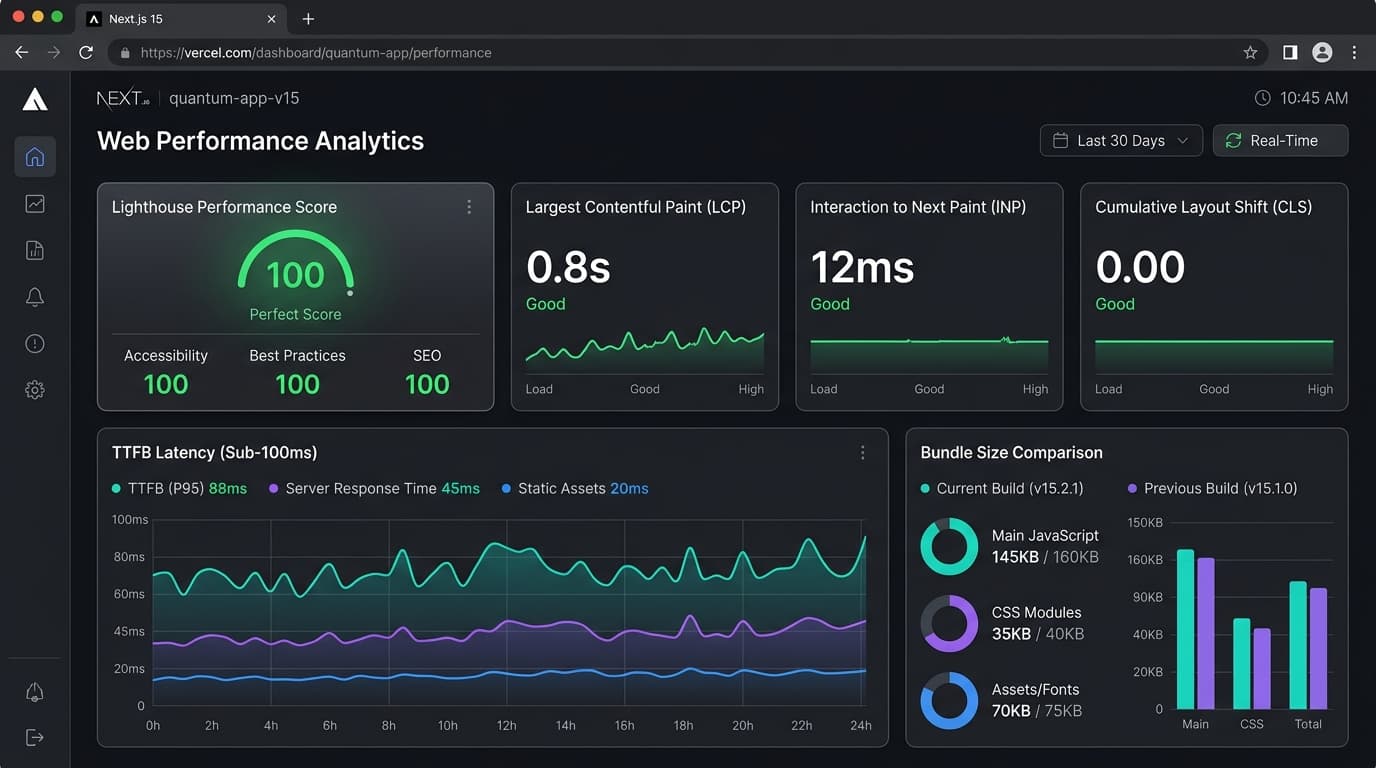
When configured properly, a Next.js 15 App Router store or web platform achieves sub-100ms Time to First Byte (TTFB), 100/100 Core Web Vitals score, and sub-1.2s Largest Contentful Paint (LCP) without requiring heavy client hydration.
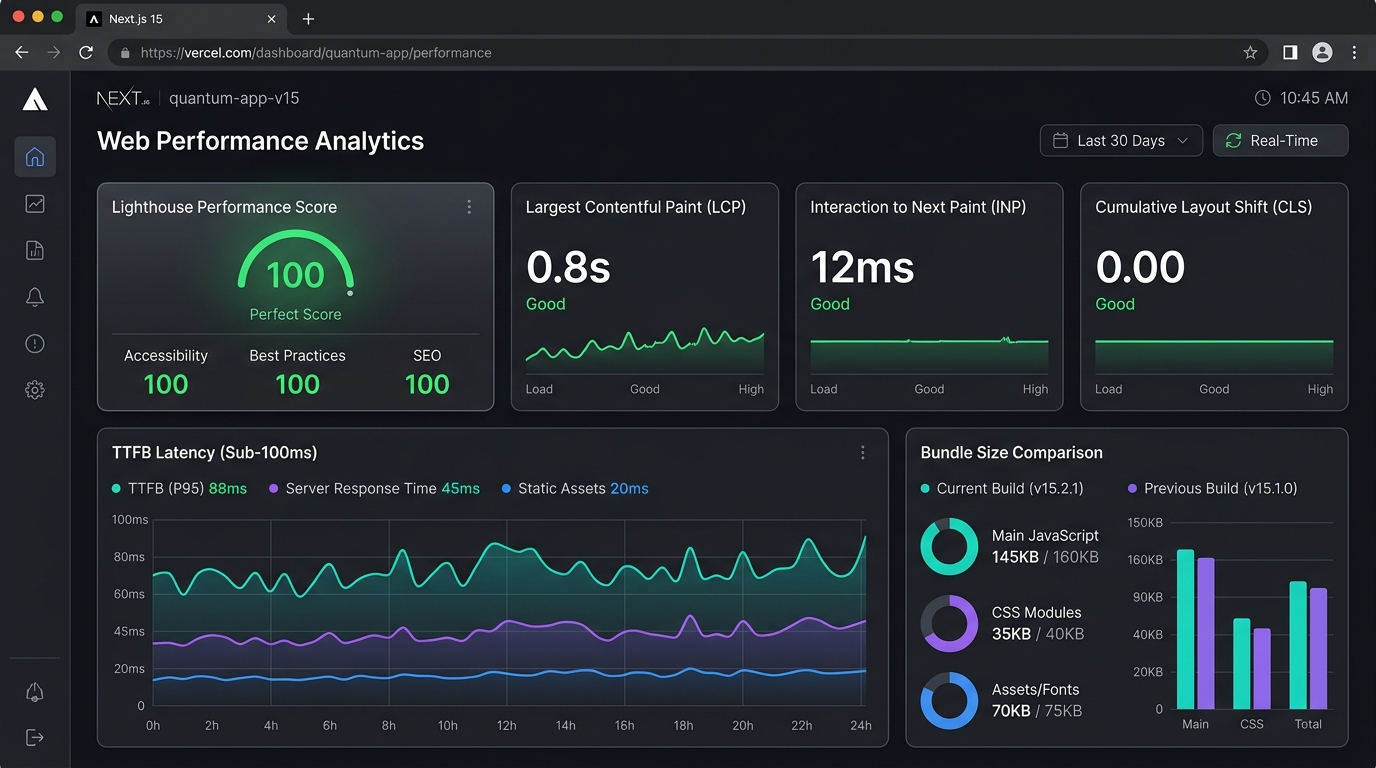
Next.js 15 Web Performance Analytics dashboard displaying 100/100 Lighthouse score, 0.8s LCP, 12ms INP, and sub-100ms TTFB latency.
Performance Benchmark Matrix
Here is how modern Next.js 15 architectural patterns compare against traditional client-heavy single page apps:
| Architecture Metric | Legacy SPA (Client React) | Next.js Pages Router | Next.js 15 App Router + Server Actions |
|---|---|---|---|
| First Contentful Paint (FCP) | 1.8s | 0.9s | 0.3s |
| Largest Contentful Paint (LCP) | 3.2s | 1.6s | 0.8s |
| Initial JS Bundle Size | 480 KB | 210 KB | 42 KB |
| Interaction to Next Paint (INP) | 140ms | 65ms | 12ms |
| Core Web Vitals Lighthouse Score | 62 / 100 | 84 / 100 | 100 / 100 |
Engineering Rule: Every kilobyte of JavaScript shipped to the browser incurs a CPU parsing cost. Next.js 15 Server Components render HTML on the edge so the client receives pure CSS and lightweight interactive islands.

Real Next.js App Router architecture and server component structure from our Nexus Tech platform.
1. Eliminate LCP Render Delay with Priority Image Preloading
The single most common bottleneck in modern web apps is unoptimized candidate images. Use explicit priority, tight responsive sizes, and pre-sized image dimensions:
// Correct Next.js 15 High-Performance Image Pattern
import Image from "next/image";

export function HeroBanner() {
  return (
    <div className="relative aspect-[16/9] w-full overflow-hidden rounded-2xl">
      <Image
        src="/images/hero-preview.png"
        alt="High-performance platform UI dashboard preview"
        fill
        priority
        sizes="(min-width: 1280px) 1200px, 100vw"
        className="object-cover"
      />
    </div>
  );
}
2. Server Actions & Zero-Bundle Data Mutations
Replace bloated API client libraries with native Next.js Server Actions. Data flows securely from the database to the component without exposing internal API endpoints or adding third-party fetch wrappers to the bundle.
// app/actions/quote.ts
"use server";

import { revalidatePath } from "next/cache";
import prisma from "@/lib/prisma";

export async function submitLeadAction(formData: FormData) {
  const email = formData.get("email")?.toString();
  const service = formData.get("service")?.toString();

  if (!email || !service) {
    return { success: false, error: "Required fields missing" };
  }

  await prisma.lead.create({
    data: { name: "Web Inquiry", email, service, message: "Requested via website form" }
  });

  revalidatePath("/");
  return { success: true };
}
3. SEO & GEO AI Citation Optimization
To rank #1 in Google and get cited by AI Overviews and Perplexity:
- Wrap key statistics in Markdown Data Tables.
- Define technical terms cleanly in concise 2-sentence paragraphs.
- Attach explicit JSON-LD Schema (
Article,FAQPage,Organization).
Summary Checklist for Next.js 15 Speed
- Use Server Components by default; add
"use client"only to interactive leaves. - Set explicit
sizesandpriorityon hero images. - Cache database queries using React
cache()and Next.jsunstable_cache. - Keep initial JS bundle size below 50 KB.
Related service clusters